Working with Cloud Optimized GeoTIFFs
Cloud Optimized GeoTIFFs in JVM Clojure
Motivation
This document shows several different methods for handling COGs in JVM Clojure without reliance on either bindings to GDAL (Geospatial Data Abstraction Library) or Python. These methods will be the subjects of subsequent articles.
What is a Cloud Optimized GeoTIFF?
A COG is a raster (pixel by pixel image) file containing geographic information, for example a satellite photograph of a part of the surface of the earth. It is a TIFF (Tagged Image File Format), which is a common format for raster graphics. It is widely used for images produced in scientific imaging. TIFF is an extensible metadata format, allowing for specifications to be built on top of it. One such specification is GeoTIFF, which requires additional geographic metadata. Cloud Optimized GeoTIFF is a sub specification of GeoTIFF that uses the TIFF metadata and multi image storage to allow for efficient partial reads over HTTP using ranged requests.
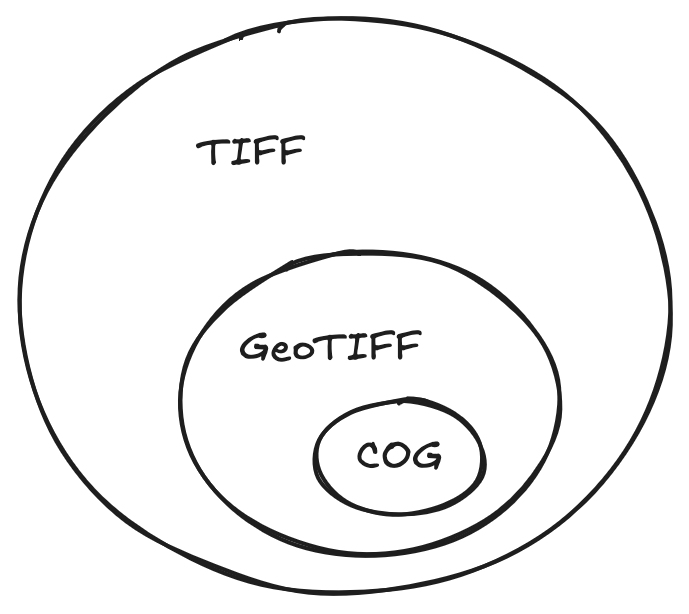
More about the internal structure of COGs can be learned in the Cloud Native Geo Guide and at COGeo.
TIFF handling with built-in Java libraries
Since GeoTIFFs are TIFFs, we can access the data with the build-in Java image libraries. This has some severe limitations, but for some use cases is the most simple approach.
Here we demonstrate opening a locally held TIFF image and inspecting pixel values:
(import '[java.awt.image BufferedImage]
        '[java.io File]
        '[javax.imageio ImageIO]
'[javax.imageio.stream FileImageInputStream])javax.imageio.stream.FileImageInputStream(defn tiff-reader []
(let [readers (ImageIO/getImageReadersByFormatName "tiff")]
(.next readers)))(defn read-tiff [file-path]
(let [file (File. file-path)
reader (tiff-reader)]
(with-open [stream (FileImageInputStream. file)]
(.setInput reader stream)
(let [images (doall
;; A single TIFF can store multiple images.
;; This will be significant when we come to
;; GeoTIFFs because of resolution pyramids.
;; See below.
(for [i (range (.getNumImages reader true))]
(let [metadata (.getImageMetadata reader i)
native-format (.getNativeMetadataFormatName metadata)]
{:index i
:native-format native-format
:width (.getWidth reader i)
:height (.getHeight reader i)
:image (.read reader i)
:metadata metadata})))]
{:images images
:reader-format (.getFormatName reader)}))))(require '[tech.v3.datatype :as dtype])(defn get-pixel [^BufferedImage image x y]
(let [raster (.getRaster image)
;; Handle images with an arbitrary number of bands.
;; Remote sensing imagery is often `multispectral`.
num-bands (.getNumBands raster)
pixel (double-array num-bands)]
(.getPixel raster x y pixel)
;; A dtype-next read-only buffer as a view of the Java array:
(dtype/as-reader pixel)))Now we use the above helper functions to handle our locally held TIFF.
(defonce example-tiff (read-tiff "src/gis/resources/example.tif"))(-> example-tiff
:images
first
:image
(get-pixel 0 0))#buffer<float64>[1]
[45.00]This also works for a GeoTIFF:
(defonce example-geotiff-medium
(read-tiff "src/gis/resources/example_geotiff_medium.tif"))(-> example-geotiff-medium
:images first :image)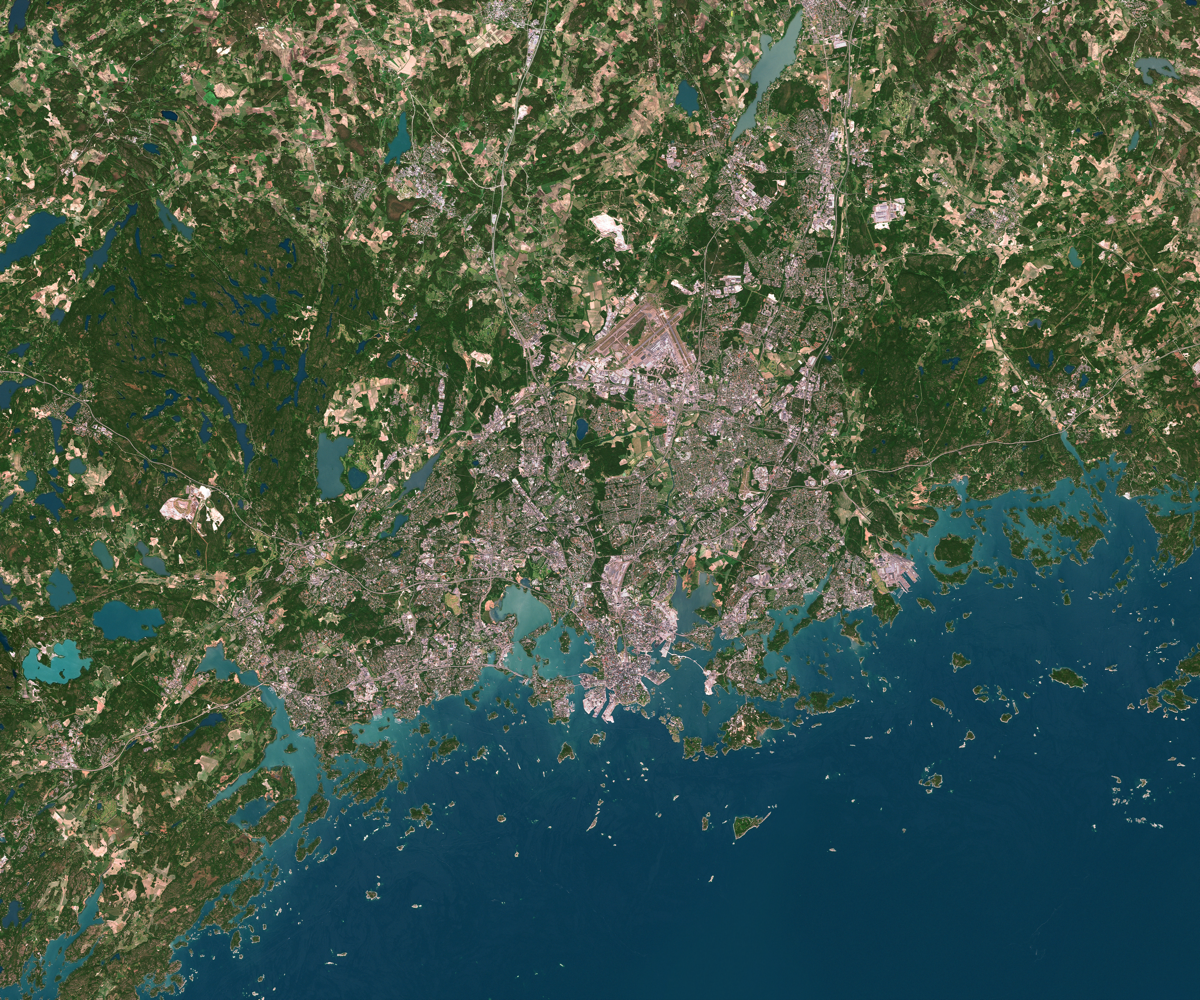
(-> example-geotiff-medium
    :images
    first
    :image
(get-pixel 0 0))#buffer<float64>[3]
[42.00, 76.00, 32.00]We can access the metadata but it’s locked up in Java OOP world and a bit of a pain to work with.
(->> example-geotiff-medium
     :images
     first
     :metadata)
#object[com.sun.media.imageioimpl.plugins.tiff.TIFFImageMetadata 0x4b46954f "com.sun.media.imageioimpl.plugins.tiff.TIFFImageMetadata@4b46954f"]Working with datasets
If we want to manipulate the data in a tabular way it is convenient to pull the data into formats handled by Clojure’s dataset stack. Here I have done that via BufferedImage. There may well be a more convenient way - please let me know!
There are several interconnected libraries for datasets in Clojure:
tablecloth-> high level API for interacting withtech.ml.datasettech.ml.dataset-> tabular datasets in Clojure. This is the core library.dtype-next-> the lowest level of this stack. array operations, buffer management, etc.
For our purposes we can just add the tablecloth dependency and that will transitively bring along the rest of the stack.
(require '[tablecloth.api :as tc]
         '[tech.v3.tensor :as tensor]
'[tech.v3.dataset.tensor :as ds-tensor])(defn buffered-image->dataset [^BufferedImage img]
(let [width (.getWidth img)
height (.getHeight img)
num-bands (.getNumBands (.getRaster img))
;; The following will be easier after dtype-next's
;; [#133](https://github.com/cnuernber/dtype-next/issues/133)
;; is resolved.
tensor (-> img
dtype/->array-buffer
;; height x width x bands
(tensor/construct-tensor (dims/dimensions
[width height num-bands]))
;; bands x height x width
(tensor/transpose [2 0 1]))
xs (dtype/as-reader
(tensor/compute-tensor [height width]
(fn [y x] x)))
ys (dtype/as-reader
(tensor/compute-tensor [height width]
(fn [y x] y)))
;; Build dataset
ds-map (into {:x xs :y ys}
(for [i (range num-bands)]
[(keyword (str "band-" i))
(dtype/as-reader
(tensor i))]))]
(-> tensor
(tensor/reshape [(* height width)
num-bands])
ds-tensor/tensor->dataset
(tc/add-columns {:x xs
:y ys})
(tc/select-columns (concat [:x :y]
(range num-bands)))
(tc/rename-columns (into {}
(for [i (range num-bands)]
[i (keyword (str "band-" i))]))))))(defonce ds (-> example-geotiff-medium
:images
first
:image
(buffered-image->dataset)))(tc/info ds):_unnamed: descriptive-stats [5 11]:
| :col-name | :datatype | :n-valid | :n-missing | :min | :mean | :max | :standard-deviation | :skew | :first | :last |
|---|---|---|---|---|---|---|---|---|---|---|
| :x | :int64 | 29989001 | 0 | 0.0 | 2999.00000000 | 5998.0 | 1731.76213725 | 0.00000000E+00 | 0 | 5998 |
| :y | :int64 | 29989001 | 0 | 0.0 | 2499.00000000 | 4998.0 | 1443.08699303 | -1.10958482E-17 | 0 | 4998 |
| :band-0 | :uint8 | 29989001 | 0 | 0.0 | 76.92727144 | 255.0 | 48.50581256 | 1.20979977E+00 | 42 | 72 |
| :band-1 | :uint8 | 29989001 | 0 | 0.0 | 76.92790493 | 255.0 | 48.50363602 | 1.20979051E+00 | 33 | 73 |
| :band-2 | :uint8 | 29989001 | 0 | 0.0 | 76.92823122 | 255.0 | 48.50667146 | 1.20996005E+00 | 38 | 71 |
We can demonstrate handling the dataset by creating an approximation of a vegetation index. Note this is just a hacky example VI since we are working with an RGB image rather than a multispectral image.
(defn add-dvi [ds]
  (-> ds
      (tc/map-columns
       :dvi
       [:band-0 :band-1 :band-2]
       (fn [b0 b1 b2]
         (- (* 2 b1)
            b0
            b2)))

      (tc/map-columns
       :veg?
       [:dvi]
#(> % 20))))(defonce ds-with-approx-dvi (add-dvi ds))(require '[tech.v3.dataset :as ds]
'[tech.v3.datatype.statistics :as dstats])(import '[java.awt Color])java.awt.Color(defn add-approx-dvi-display
;; change the range to 0-255 for display.
[dataset]
(let [dvi-max (-> ds-with-approx-dvi :dvi dstats/max)
dvi-min (-> ds-with-approx-dvi :dvi dstats/min)
dvi-range (- dvi-max dvi-min)]
(tc/map-columns dataset
:dvi-display
[:dvi]
#(->>
(/ (- % dvi-min)
dvi-range)
(* 255)
int))))(defonce ds-with-dvi-display
(add-approx-dvi-display ds-with-approx-dvi))(defn dataset->image
[dataset {:as columns-mapping
:keys [r g b]}]
(let [height (->> dataset
:y
((juxt dstats/max dstats/min))
(apply -))
width (->> dataset
:x
((juxt dstats/max dstats/min))
(apply -))]
(-> columns-mapping
(update-vals dataset)
tc/dataset
ds-tensor/dataset->tensor
(tensor/reshape [height width 3])
bufimg/tensor->image)))(dataset->image ds-with-dvi-display
{:r :dvi-display
:g :dvi-display
:b :dvi-display})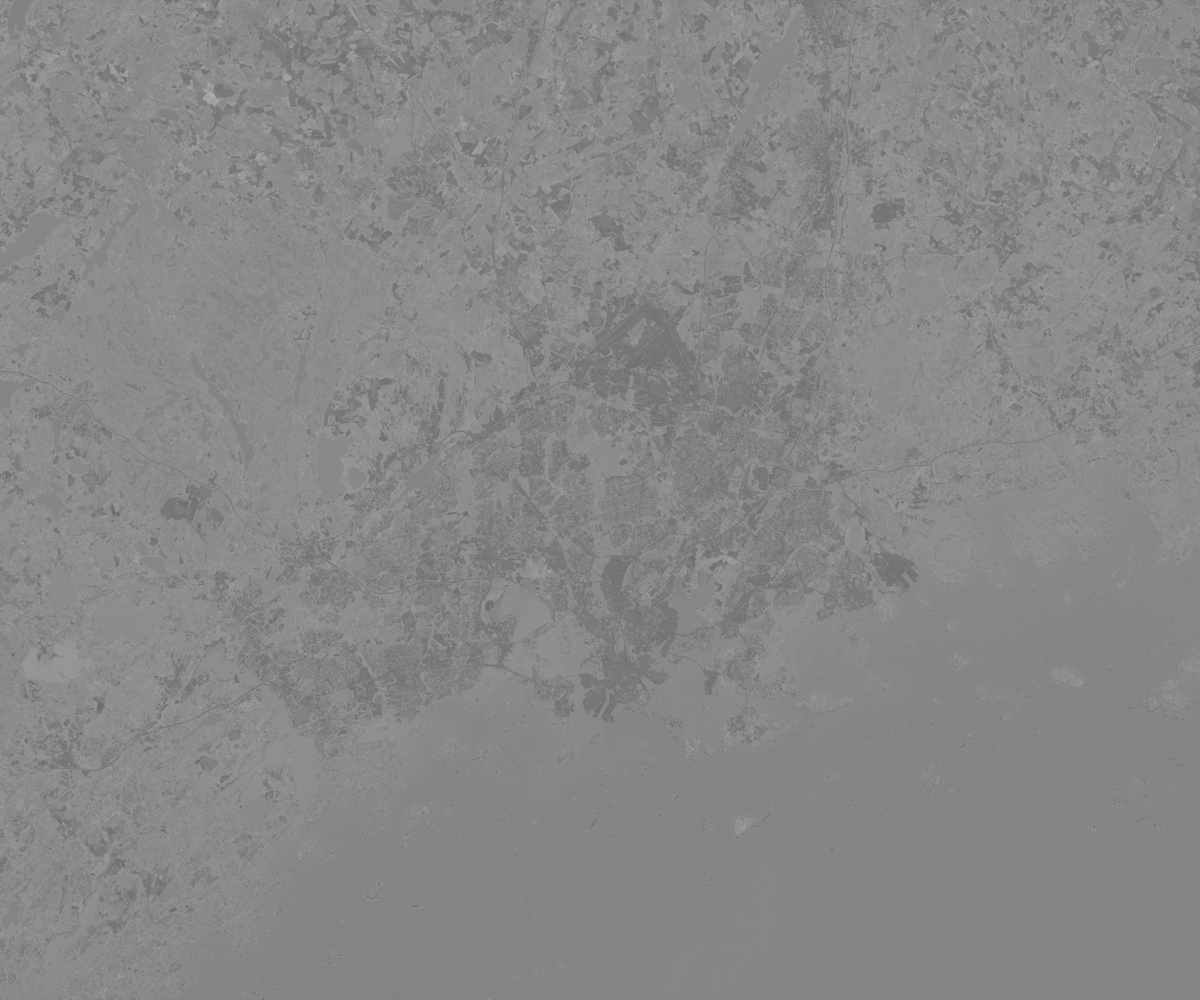
Here we can see the image changed to a grayscale map of our approximate vegetation index (not very accurate since this is an RGB image rather than specific frequency bands). The urban areas are darker. The water has been mistaken for high vegetation with this simple comparison of green to other colors.
So far we have just used built-in Java image handling libraries and Clojure’s dataset stack for manipulating the data. This is the simplest workflow for GeoTIFFs but is limited to working with pixels rather than using the GeoTIFF metadata to handle the imagery in a geographically informed way.
Third party Java GIS libraries
The interesting part of GeoTIFF metadata is encoded in such a way that makes it not straightforward to read using only built-in Java libraries. This metadata contains useful information such as coordinate system, location, number of channels and so on. If we want to use it, we have a number of options:
Roll your own GeoTIFF metadata reader using
javax.imageio.metadataand use field accessors and walk the metadata tree to find the information that you want.Apache SIS
GeoTools
Python Interop (with Rasterio)
Use the GDAL binary with a Java library to handle the GeoTIFF and read the metadata. The last two will be the subjects of subsequent articles.
Apache SIS
Apache SIS is a spatial information system library that can handle files such as GeoTIFF and NetCDF. It is capable of GIS operations such as getting raster values at specific geographic coordinates. Here are developer docs for Apache SIS. It’s worth a scan to be aware of some terminology used in this library, for example:
- Coverage: a function that returns an attribute value for a given coordinate (this includes raster images).
It is also capable of exporting GeoTIFF metadata to XML.
(import '[org.apache.sis.storage DataStores StorageConnector])org.apache.sis.storage.StorageConnector(require '[clojure.java.io :as io])(def datastore
(-> (io/file "src/gis/resources/example_geotiff_medium.tif")
StorageConnector.
DataStores/open))We can view the metadata in this interesting output format that SIS provides.
(-> datastore
    .getMetadata
print)#object[org.apache.sis.metadata.iso.DefaultMetadata 0x78245dd0 Metadata
├─Metadata identifier……………………………………………………………… example_geotiff_medium
├─Metadata standard (1 of 2)…………………………………………… Geographic Information — Metadata Part 1: Fundamentals
│ ├─Edition…………………………………………………………………………………… ISO 19115-1:2014
│ ├─Identifier…………………………………………………………………………… 19115-1
│ │ ├─Code space………………………………………………………………… ISO
│ │ └─Version………………………………………………………………………… 2014
│ ├─Cited responsible party
│ │ ├─Role………………………………………………………………………………… Principal investigator
│ │ └─Party……………………………………………………………………………… International Organization for Standardization
│ └─Presentation form………………………………………………………… Document digital
├─Metadata standard (2 of 2)…………………………………………… Geographic Information — Metadata Part 2: Extensions for imagery and gridded data
│ ├─Edition…………………………………………………………………………………… ISO 19115-2:2019
│ ├─Identifier…………………………………………………………………………… 19115-2
│ │ ├─Code space………………………………………………………………… ISO
│ │ └─Version………………………………………………………………………… 2019
│ ├─Cited responsible party
│ │ ├─Role………………………………………………………………………………… Principal investigator
│ │ └─Party……………………………………………………………………………… International Organization for Standardization
│ └─Presentation form………………………………………………………… Document digital
├─Spatial representation info
│ ├─Axis dimension properties (1 of 2)…………… Column
│ │ ├─Resolution………………………………………………………………… 10
│ │ └─Dimension size……………………………………………………… 5,999
│ ├─Axis dimension properties (2 of 2)…………… Row
│ │ ├─Resolution………………………………………………………………… 10
│ │ └─Dimension size……………………………………………………… 4,999
│ ├─Cell geometry…………………………………………………………………… Area
│ ├─Transformation parameter availability…… True
│ ├─Check point availability……………………………………… False
│ ├─Point in pixel………………………………………………………………… Upper left
│ ├─Transformation dimension description……… PCS Name = WGS 84 / UTM zone 35N
│ └─Number of dimensions………………………………………………… 2
├─Reference system info………………………………………………………… WGS 84 / UTM zone 35N
├─Identification info
│ ├─Citation………………………………………………………………………………… example_geotiff_medium
│ │ └─Identifier………………………………………………………………… example_geotiff_medium
│ ├─Spatial representation type……………………………… Grid
│ ├─Spatial resolution
│ │ └─Distance……………………………………………………………………… 10
│ ├─Extent
│ │ └─Geographic element
│ │ ├─West bound longitude…………………………… 24°21′09.6393866617″E
│ │ ├─East bound longitude…………………………… 25°27′50.7567867074″E
│ │ ├─South bound latitude…………………………… 60°00′41.8670861344″N
│ │ ├─North bound latitude…………………………… 60°28′37.9415593454″N
│ │ └─Extent type code……………………………………… True
│ └─Resource format
│ ├─Format specification citation……………… GeoTIFF
│ │ └─Other citation details……………………… Read with Apache Spatial Information System version 1.5.
│ └─File decompression technique………………… None
├─Content info
│ └─Attribute group
│ ├─Attribute (1 of 3)…………………………………………… Red
│ │ └─Bits per value…………………………………………… 8
│ ├─Attribute (2 of 3)…………………………………………… Green
│ │ └─Bits per value…………………………………………… 8
│ └─Attribute (3 of 3)…………………………………………… Blue
│ └─Bits per value…………………………………………… 8
├─Metadata scope
│ └─Resource scope………………………………………………………………… COVERAGE
└─Locale………………………………………………………………………………………………… English
└─Character set…………………………………………………………………… US-ASCII
]nilSee the SIS documentation for converting this to Map, TreeTable or XML (it’s not very ergonomic)
Now that we are using a specialised GIS library, we can do things like fetch a specific area of interest from it with geographic coordinates:
(import '[org.apache.sis.coverage.grid GridGeometry]
'[org.apache.sis.geometry GeneralEnvelope])org.apache.sis.geometry.GeneralEnvelope(defn read-aoi-from-geographic-bounds
[store lon-min lon-max lat-min lat-max]
(let [coverage-resource (-> store .components first)
;; Get just the grid geometry metadata (no image data loaded)
grid-geometry (.getGridGeometry coverage-resource)
crs (.getCoordinateReferenceSystem grid-geometry)
;; Create envelope in the same CRS
geo-envelope (doto (GeneralEnvelope. crs)
(.setRange 0 lon-min lon-max)
(.setRange 1 lat-min lat-max))
;; Create grid geometry for the AOI
aoi-grid-geometry (GridGeometry. geo-envelope)]
;; Read ONLY the subset (no full image loaded)
(.read coverage-resource aoi-grid-geometry nil)))(def aoi-coverage
(read-aoi-from-geographic-bounds
datastore
385000 390000
6655000 6660000))Access the image data
(def aoi-image (.render aoi-coverage nil))(import '[java.awt RenderingHints]
'[java.awt.geom AffineTransform])java.awt.geom.AffineTransform(defn tiled-image->buffered-image [tiled-image]
(let [width (.getWidth tiled-image)
height (.getHeight tiled-image)
buffered-image (BufferedImage. width height BufferedImage/TYPE_INT_ARGB)
graphics (.createGraphics buffered-image)
identity-transform (AffineTransform.)]
(doto graphics
(.setRenderingHint RenderingHints/KEY_INTERPOLATION RenderingHints/VALUE_INTERPOLATION_NEAREST_NEIGHBOR)
(.drawRenderedImage tiled-image identity-transform)
(.dispose))
buffered-image))(tiled-image->buffered-image aoi-image)
(.close datastore)nilWe can also do efficient, ranged request access of COGs over HTTP:
(import '[java.net URI])java.net.URI(def cog-url "https://sentinel-cogs.s3.us-west-2.amazonaws.com/sentinel-s2-l2a-cogs/36/Q/WD/2020/7/S2A_36QWD_20200701_0_L2A/TCI.tif")(def cog-datastore
(-> (URI. cog-url)
StorageConnector.
DataStores/open))View COG dimensions without downloading the full image
(-> cog-datastore
    .components
    first
    .getGridGeometry
    .getEnvelope
    (#(identity
       {:x [(.getMinimum % 0) (.getMaximum % 0)]
        :y [(.getMinimum % 1) (.getMaximum % 1)]
:crs (.getCoordinateReferenceSystem %)}))){:x [499980.0 609780.0],
:y [1790220.0 1900020.0],
:crs
#object[org.apache.sis.referencing.crs.DefaultProjectedCRS 0x37992194 "ProjectedCRS[\"WGS 84 / UTM zone 36N\",\n BaseGeogCRS[\"WGS 84\",\n Datum[\"World Geodetic System 1984\",\n Ellipsoid[\"WGS 1984\", 6378137.0, 298.257223563]],\n Unit[\"degree\", 0.017453292519943295]],\n Conversion[\"UTM zone 36N\",\n Method[\"Transverse Mercator\"],\n Parameter[\"Latitude of natural origin\", 0.0],\n Parameter[\"Longitude of natural origin\", 33.0],\n Parameter[\"Scale factor at natural origin\", 0.9996],\n Parameter[\"False easting\", 500000.0],\n Parameter[\"False northing\", 0.0]],\n CS[Cartesian, 2],\n Axis[\"Easting (E)\", east],\n Axis[\"Northing (N)\", north],\n Unit[\"metre\", 1],\n Id[\"EPSG\", 32636, \"9.9.1\", Citation[\"Subset of EPSG\"], URI[\"urn:ogc:def:crs:EPSG:9.9.1:32636\"]],\n Remark[\"Definitions from public sources. When a definition corresponds to an EPSG object (ignoring metadata), the EPSG code is provided as a reference where to find the complete definition.\"]]"]}(def cog-aoi-coverage
(read-aoi-from-geographic-bounds
cog-datastore
500000 550000
1800000 1850000))(defonce cog-aoi-image (.render cog-aoi-coverage nil))(tiled-image->buffered-image cog-aoi-image)
(.close cog-datastore)nilGeoTools
GeoTools is another third party Java library for geospatial data manipulation. It’s more mature and more widely used than SIS. It has a larger footprint.
It can read COGs via HTTP but unfortunately has no built-in way to do partial reads. It is reportedly possible to set it up to do so with geosolutions-it/imageio-ext but I have had no luck setting it up to do so correctly.
Here we can see GeoTools accessing a locally stored GeoTIFF:
(import '[org.geotools.gce.geotiff GeoTiffReader])org.geotools.gce.geotiff.GeoTiffReader(defn geotools-read-geotiff [filepath]
(let [file (File. filepath)
reader (GeoTiffReader. file)
coverage (.read reader nil)]
{:coverage coverage
:envelope (.getEnvelope coverage)
:crs (.getCoordinateReferenceSystem coverage)}))(defn coverage->buffered-image [coverage]
(let [rendered-image (.getRenderedImage coverage)]
(if (instance? BufferedImage rendered-image)
rendered-image
(let [width (.getWidth rendered-image)
height (.getHeight rendered-image)
buffered (BufferedImage. width height BufferedImage/TYPE_INT_ARGB)
graphics (.createGraphics buffered)]
(.drawRenderedImage graphics rendered-image (AffineTransform.))
(.dispose graphics)
buffered))))(defonce medium-geotiff
(geotools-read-geotiff "src/gis/resources/example_geotiff_medium.tif"))(->> medium-geotiff
:coverage
coverage->buffered-image)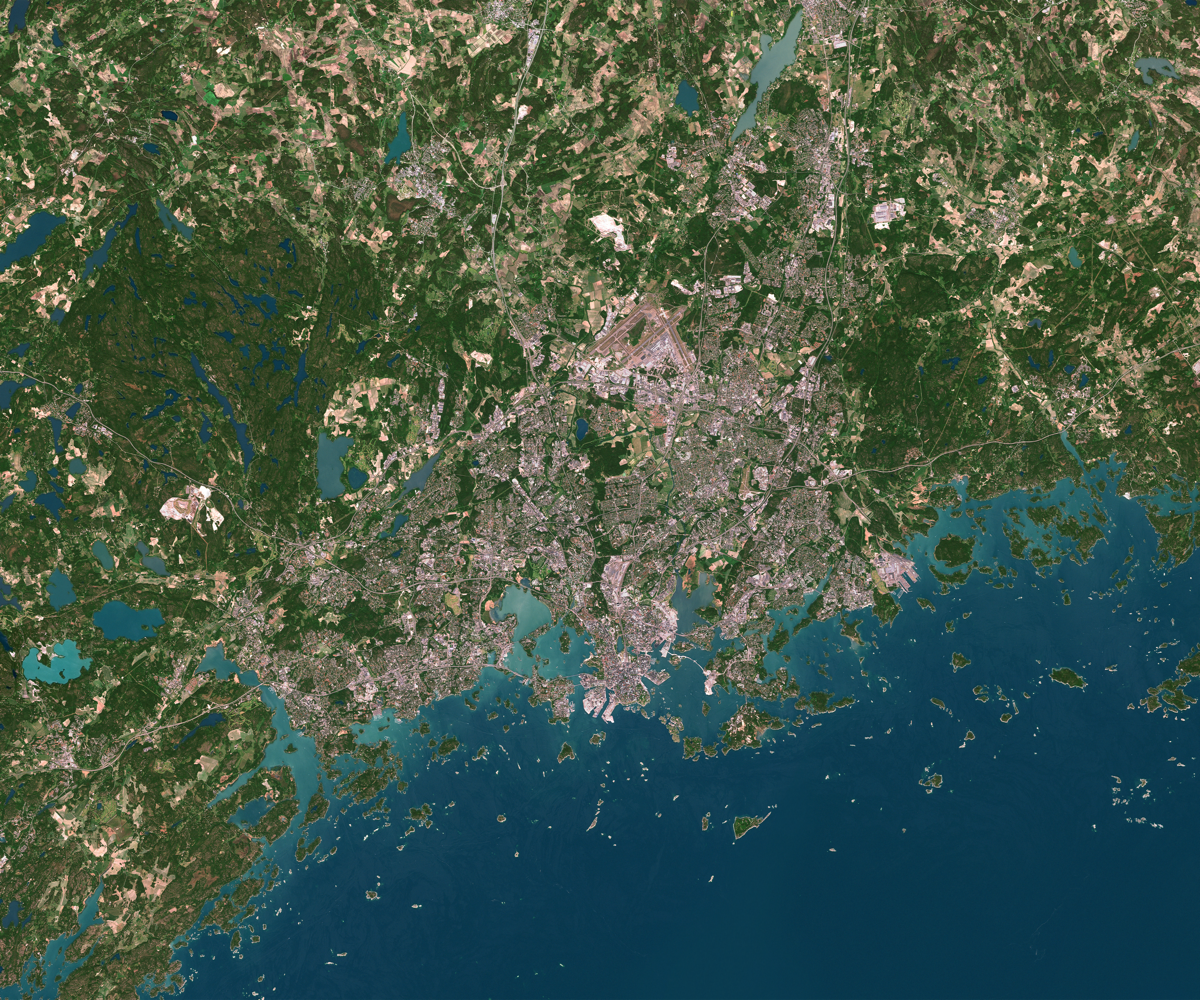
Next steps
This document can be improved with more extensive examples of GeoTIFF handling. For example Cropping by geometry. Also benchmarking different approaches for a performance comparison.
Pull requests are welcome. Please refer to src/gis/geotiff.clj at Clojure Civitas
source: src/gis/geotiff.clj